Evaluating the Sweet Honey Editable Text Effect for Adobe Illustrator Projects
For graphic designers and digital artists, the difference between a standard layout and a compelling visual often lies in the typography. While custom lettering offers uniqueness, it requires significant time and skill to execute from scratch. This is where specialized resources like the Sweet Honey Editable Text Effect enter the workflow. Designed specifically for Adobe Illustrator, this asset provides a pre-styled, cartoon-inspired aesthetic that can be applied instantly to vector text. However, before integrating such tools into a professional pipeline, it is essential to understand their technical constraints, compare them against alternative methods, and determine if they align with your specific project requirements.
Defining the Asset: More Than Just a Font
A common misconception when encountering products like the Sweet Honey Editable Text Effect is confusing them with font files. It is crucial to clarify immediately that this is not a font design. Instead, it operates as a collection of Graphic Styles within the Adobe Illustrator ecosystem. This distinction fundamentally changes how the tool is used and what it can achieve.
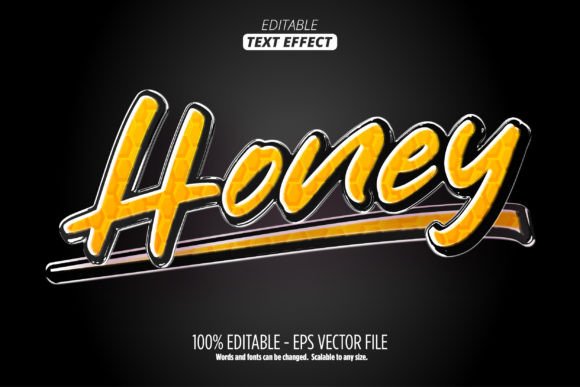
Traditional fonts provide glyph shapes but rarely include complex fills, strokes, shadows, or texture overlays unless those features are built into the character design itself, which limits flexibility. In contrast, the Sweet Honey effect utilizes Illustrator's appearance panel capabilities. It wraps your existing vector text in a layer of stylistic attributes—likely involving warm, golden hues, rounded edges, and perhaps a glossy or viscous finish reminiscent of honey. Because it relies on Graphic Styles, the underlying text remains fully editable. You can change the wording, adjust the kerning, or swap the typeface entirely while retaining the complex visual treatment. This separation of content (the text) and style (the effect) is the primary advantage over static image overlays or pre-rendered font sets.
Technical Prerequisites and Compatibility Constraints
When evaluating any digital asset, compatibility is a decisive factor. The Sweet Honey Editable Text Effect is engineered exclusively for Adobe Illustrator. The documentation explicitly states that it will not function in other applications such as Photoshop, Affinity Designer, or Canva. This limitation stems from the reliance on Illustrator's specific handling of vector appearances and EPS file structures.
The package typically includes an .eps file, which serves as the carrier for the graphic styles, along with a JPG preview and a README PDF. For users working in a multi-software environment, this creates a potential bottleneck. If your final output needs to be edited in a raster-based program later, you must apply the effect in Illustrator first, expand the appearance if necessary, and then export. Furthermore, because it is a vector-based style, it boasts infinite scalability. Whether you are designing a small social media icon or a large-format billboard, the quality remains crisp without pixelation. This makes it a robust choice for projects requiring multiple output sizes from a single source file.
Comparative Analysis: Custom Styling vs. Pre-Made Effects
To make an informed decision, one must weigh the benefits of using the Sweet Honey Editable Text Effect against the alternative of creating similar effects manually or using different categories of resources.
Manual Creation in Illustrator
An experienced designer could theoretically recreate a "sweet honey" look by manually stacking strokes, applying gradients, adding drop shadows, and tweaking opacity masks. The Tradeoff: While manual creation offers 100% control over every anchor point and gradient stop, it is time-consuming. Recreating a consistent style across ten different headlines could take hours. The Sweet Honey effect condenses this process into a single click. The downside is a slight loss of granular control; you are working within the parameters set by the creator, though the "100 editable" claim suggests significant room for color and structural adjustments.
Raster-Based Layer Styles (Photoshop)
Many designers are accustomed to Layer Styles in Photoshop. These offer similar non-destructive editing capabilities. The Difference: Photoshop styles are resolution-dependent unless smart objects are used meticulously. The Illustrator-based Sweet Honey effect maintains true vector integrity. If your workflow is predominantly print-focused or requires scaling for various merchandise (from business cards to vehicle wraps), the vector nature of this tool is superior to raster alternatives.
Standard Font Downloads
Downloading a "cartoon" or "bubble" font is another common approach. The Limitation: Fonts are rigid. If the font doesn't have the exact gloss or shadow depth you need, you cannot easily add it without breaking the font's licensing or visual consistency. With the Sweet Honey Graphic Style, you can apply the effect to a clean, readable sans-serif font, ensuring legibility while still achieving the desired playful aesthetic. This hybrid approach often yields more professional results than relying solely on a novelty font.
Ideal Use Cases and Strategic Application
Understanding where this tool fits best helps maximize its value. The aesthetic described as "cartoon" and "sweet honey" suggests a warm, inviting, and playful tone. This makes the effect particularly well-suited for:
- Food and Beverage Branding: Logos or packaging for bakeries, juice bars, or confectionery shops where a liquid, golden, or sugary visual metaphor is appropriate.
- Children's Media: Titles for educational apps, YouTube thumbnails for kids' content, or party invitations where high-contrast, friendly typography is required.
- Promotional Materials: Sale badges, stickers, or social media graphics that need to pop without looking overly corporate or severe.
Conversely, this effect may not be the right choice for industries requiring strict minimalism, such as legal services, high-end luxury fashion, or technical documentation. In these contexts, the "cartoon" nature of the style could undermine the perceived authority of the brand. Always evaluate the emotional resonance of the style against your brand guidelines before purchase.
Editing Flexibility and Workflow Integration
The promise of being "very easy to edit" is a critical selling point for professionals managing tight deadlines. Upon opening the EPS file in Illustrator, the user gains access to the Graphic Styles panel. Applying the effect is typically a matter of selecting a text object and clicking the style swatch. From there, the "ingredients" of the look—colors, stroke weights, and glow intensities—can be modified.
Because the text remains live, you do not need to re-type your content into a specific template. You can type directly on the artboard, apply the style, and then tweak the font family if the default does not match your vision. This flexibility allows for rapid iteration. For example, a designer might test the effect on a bold, rounded font for a maximum "bubbly" impact, then switch to a thinner script to see if the "honey" drip effect translates well to finer lines. This ability to experiment without starting over is where the true efficiency gain lies.
Limitations and Decision Factors
While the Sweet Honey Editable Text Effect offers clear advantages, it is not a universal solution. Potential buyers should consider the following limitations:
- Software Dependency: As noted, this requires Adobe Illustrator. Users subscribed only to Photoshop or free alternatives like Inkscape (which may not fully support complex EPS graphic styles in the same way) will find this asset unusable.
- Style Specificity: The effect is niche. If your project portfolio varies wildly from corporate reports to grunge posters, a single stylized effect may have limited utility compared to a broader library of neutral styles.
- Learning Curve for Novices: While "easy to edit," users unfamiliar with the Appearance Panel or Graphic Styles in Illustrator may initially struggle to customize the colors or expand the object for further manipulation. The included Readme.pdf is vital here, and users should be prepared to consult it.
Making the Final Choice
Ultimately, the decision to utilize the Sweet Honey Editable Text Effect comes down to a balance between time savings and stylistic fit. If you are an Illustrator user looking to inject a specific, warm, cartoon-like energy into your projects without spending hours building complex appearance stacks, this tool represents a logical investment. It bridges the gap between the rigidity of standard fonts and the labor intensity of custom vector illustration.
However, if your workflow relies heavily on raster images, or if your design language demands stark minimalism, this resource may not align with your needs. By understanding that this is a scalable, editable Graphic Style rather than a static font, designers can better anticipate how it will integrate into their existing pipelines. For those who fit the target demographic of content creators, branding specialists, and illustrators needing quick, high-quality typographic accents, the Sweet Honey effect offers a practical, efficient solution that maintains the professional standard of vector scalability.